

Hi, Welcome to AndroidRide!.
Let’s learn about Kotlin for loop with index.
For loop with indices property
In this simple example, we will use indices property of collections to get the index.
    val items = listOf("A","B", "C")

    for(index in items.indices){
        println("indices: $index, item: ${items[index]}")
    }


- Here, indices property returns 0..2 (IntRange)
- using indices and string template interpolation, we can take data from items list and display like shown above.
- Better to use indices, if you only need the index.
- You can use the indices property with arrays and strings to access their indices. However, it doesn’t work with maps or sets since they are not indexed.
Contents
For loop with string value
In this section, we can use indices property with string value.
 val strValue = "String"
        for(i in strValue.indices){
            println("index: $i, char: ${strValue[i]}")
        }
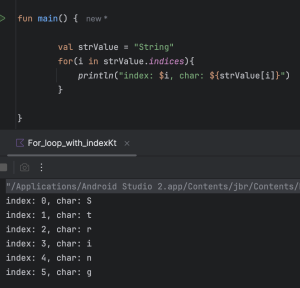

- Each character’s index will be iterated, and using the index, we can access and display the corresponding character.
ArrayList with index example
Kotlin arraylist helps to store data in dynamic array.
    val arrayListItems = arrayListOf("Item 1", "Item 2", "Item 3")
        for(index in arrayListItems.indices){
            println("ArrayList with index: ${arrayListItems[index]}")
            }
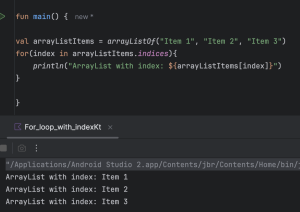
- just like above examples, indices property returns 0..to size of the arraylist – 1.
Using withIndex() method
If you need both the index and the item while iterating, use withIndex().
 val char = arrayOf("a", "b", "c")
    for ((index, ch) in char.withIndex()) {
        println("Index: $index, character: $ch")
    }
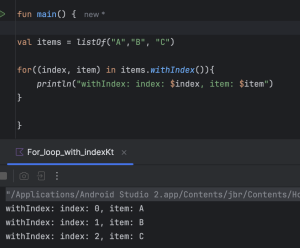

- In this section, arrayOf() creates an array with 3 characters.
- withIndex() returns IndexedValue which gives index and value.
Complete Source Code
package com.androidride.kotlin

fun main() {

    val items = listOf("A", "B", "C")
    for (index in items.indices) {
        println("indices: $index, item: ${items[index]}")
    }

    val strValue = "String"
    for (i in strValue.indices) {
        println("index: $i, char: ${strValue[i]}")
    }

    val arrayListItems = arrayListOf("Item 1", "Item 2", "Item 3")
    for (index in arrayListItems.indices) {
        println("ArrayList with index: ${arrayListItems[index]}")
    }

    for ((index, item) in items.withIndex()) {
        println("withIndex: index: $index, item: $item")
    }

}
Please add star to AndroidRide repository, if you like.
Please share with your friends and family.